1. Phone Information, Usage and Battery – *#*#4636#*#* 2. IMEI Number – *#06# 3. Enter Service Menu On Newer Phones – *#0*# 4. Detailed Camera Information – *#*#34971539#*#* 5. Backup All Media Files – *#*#273282*255*663282*#*#* 6. Wireless LAN Test – *#*#232339#*#* 7. Enable Test Mode for Service – *#*#197328640#*#* 8. Back-light Test – *#*#0842#*#* 9. Test the Touchscreen – *#*#2664#*#* 10. Vibration Test – *#*#0842#*#* 11. FTA Software Version – *#*#1111#*#* 12. Complete Software and Hardware Info – *#12580*369# 13. Diagnostic Configuration – *#9090# 14. USB Logging Control – *#872564# 15. System Dump Mode – *#9900# 16. HSDPA/HSUPA Control Menu – *#301279# 17. View Phone Lock Status – *#7465625# 18. Reset the Data Partition to Factory State – *#*#7780#*#* 19. Format Your Device To Factory State(will delete everything on your phone) – *2767*3855# 20. Hidden Service Menu For Motorola Droid – ##7764726
Download Top 10 #ANDROID#HACKING and #PENETRATING apps
1. #WiFiKill----->
WiFi Kill is one of the best app for disable other user wifi connection
from your android mobile. You just need to download this amazing
android app in your phone and you can easily kick off other user from
connected wifi . Make sure your phone is rooted ex: if ur connected to ur clg wifi ..... just kill all the other phones wifi here is the download link :- http://www.mediafire.com/downl…/wycg4qyx4168euz/WiFiKill.apk
2. #WiFiInspect ------->
WiFi inspect android app scan your wifi networks for vulnerability. You
can see other user ip address from this android app. Basically this
android app scan other ip address, mac address and device name. here is the download link :-http://www.mediafire.com/dow…/w9zf3p8g1v5wyaq/WiFinspect.apk
3.#ZAnti Penetration Testing Android Hacking Toolkit ------->
This is one of favourite tools for hacking networks and run security
tests on wifi networks. You can find almost all security tools related
to hacking any wifi networks from this android app. ZAnti is one of the
most impressive android app related to hacking from android phone.You
can hack facebook,gmail,outlook and much more with this app here is the download link :- http://www.mediafire.com/download/1v84ktmoohlhy8o/zANTI.apk
4.#Wps Wpa Tester ------>
if you really want to hack wifi password from android mobile download
WPS connect wifi password hacking android app. You can easily connect
any wifi network without password from this wifi hacking apk. But make
sure that wifi runs on wps security. This android app has a collection
of master key routers that runs in wps security mode. So you can easily
hack any wps networks and bypass security and connect your android
mobile device with wifi. here is the download link :- http://www.mediafire.com/…/4rco2zcrer0bf…/Wps+Wpa+Tester.apk
5.#inSSIDer ------->
Inssider helps you in finding hidden wifi in your area. If a smart wifi
admin lived in your area they set wifi ssid ti hidden, normally you
can't see wfi name and signal in your pc and android mobile. But If you
download this amazing app , you can see hidden ssid wifi signal and also
find low range wifi signal in your area, With this android app you can
also see lots of info related to wifi connection. here is the download link :-http://www.mediafire.com/…/dhed2y3jdj…/inSSIDer_v4.0.2.9.apk
6.#Dsploit ----->
dSploit is an advance toolkit to perform network security assesments on
mobile phones. It is a complete toolkit so you can perform various
attacks like password sniffing, real time traffic manipulation, etc.It
is an Android network analysis and penetration suite which aims to offer
to IT security experts/geeks the most complete and advanced
professional toolkit to perform network security assessments on a mobile
device. here is the download link :-http://www.mediafire.com/downlo…/mlo4aqh0hf2ruj7/DSploit.apk
7. #Faceniff----->
Your Facebook account is at risk, just like a Firesheep (for firefox
hacking) there is a FaceNiff for hijacking the session of famous social
networking websites includes facebook and twitter. FaceNiff is developed
by Bartosz Ponurkiewicz who created Firesheep before, but faceoff is
for android OS.Allows you to sniff and intercept web session profiles
over the WiFi that your mobile is connected to. It is possible to hijack
sessions only when WiFi is not using EAP, but it should work over any
private networks here is the download link :- http://www.mediafire.com/d…/0ri8ixnw3je5j3a/FaceNiff-2.4.apk
8.#Penetrate Pro ------> Penetrate Pro android app allows to decode and access a secure Wifi Network from Android.
Penetrate Android would be a great handy app for you to get access to
the secure wifi network from Android Smartphone and Devices. The app
calculates WEP/WPA keys for some WiFi routers and lets you to get access
by using the password. Unlock WiFI with Penetrate pro Android App. Use
wisely this app, Hacking or cracking WiFI network is not something we
recommend you to do. Use this app only for test purpose with permission
from network owners. The app aimed to use in penetration testing to
improve security setting for wireless networks. Note that some
antivirus apps for android think Penetrate Pro as a virus because it is a
security-related tool. Don’t panic as Penetrate can in no way affect
the regular function of your phone. here is the download link :- http://www.mediafire.com/…/p3tpcpnf1tdv6rt/Penetrate+Pro.apk
9:-#Network Spoofer------> Network Spoofer lets you mess with websites on other people's computers: 1)flip pictures 2)change Google searches 3)redirect websites 4)swap YouTube videos and many more features to come. here is the download link :- http://www.mediafire.com/…/4zp5g4nx3ixt034/uk.digitalsquid.…
10:-#Droidsheep
DroidSheep can be easily used by anybody who has an Android device and
only the provider of the web service can protect the users. So Anybody
can test the security of his account by himself and can decide whether
to keep on using the web service.It is an Android app for Security
analysis in wireless networks and capturing facebook, twitter, LinkedIn
and other accounts.DroidSheep was developed as a tool for testing the
security of your accounts and is based on my Bachelor thesis with title
‘Session Hijacking on Android Devices’. here is the download link :- http://www.mediafire.com/…/2pwf06x2bqpo9re/droidsheep-15.apk
HOW TO UNLOCK PATTERN / PASSWORD LOCK IN ANDROID PHONE/TAB....
1. Download adb for windows... use this link... http://adbshell.com/downloads
and if u r using linux.. then just open terminal and follow the steps
(except step no.3 coz that's only for windows users)...
2. Connect ur locked android phone using usb cable...
3. Goto the folder in ur pc where the download adb file exists.. hold
SHIFT and then right click on mouse... click on "open command window
here"..
4. Now type adb devices and press enter... and then ur connected device will be shown there...
5. Type adb shell press enter.. then type su to activate superuser mode .
6. Type rm /data/system/gesture.key (if there's a pattern lock) or
else type rm /data/system/password.key (if there's a password or
pin lock)..
7. Press enter..
Now.. tap on ur mobile/tab screen... and CONGO... u just did it... without any data loss... wink emoticonpacman emoticon
Note:- 1. usb debuging mode must be ''ON'' in ur phone settings...
2. There's a space between rm and / ...ENJOY...!!!
Xiaomi made a big splash at MWC 2016
with its new flagship Mi 5 series. These long awaited devices are
currently confirmed for the Indian and Chinese markets but Xiaomi's
Global VP for Xiaomi said in an interview that Xiaomi has "other markets
on their radar screen."
The design and specs of these two
devices are impressive. The normal Mi 5 version has a 3D glass rear
panel, 32 GB or 64 GB of internal storage and 3 GB of RAM. The Pro
version comes with a ceramic back, 128 GB of internal storage and 4 GB
RAM. Both come with a Snapdragon 820 processor and a new 4-axis optical
image stabilization system that wowed at MWC 2016.
The incredible
prices of these devices is perhaps the most remarkable thing about
them. The lowest cost (32 GB) version is set to be released at
US$407.99. The 64 GB Mi 5 version is going to come in at US$459.99 and
the Mi 5 Pro at US$515.99.
The Xiaomi Mi 5 has the specs of a premium device at a mid-range price.
Xiaomi Mi 5 (32 GB)
US$407.99
antelife
Xiaomi Mi 5 (64 GB)
US$459.99
antelife
Xiaomi Mi 5 Pro (128 GB)
US$515.99
antelife
Xiaomi Mi Note Pro
Another great phone from Xiaomi,
the Mi Note Pro is as premium as any phone on this list. The Mi Note Pro
is available in a gold finish and packs the Snapdragon 810, a whopping 4
GB of RAM, 64 GB of on-board storage, 13 MP shooter with OIS, rolled
glass on the back edges and 5.7-inch QHD display on the front.
So how much would you expect to pay for a phone this good? How about US$350? Yes, that little.
The Xiaomi Mi Note Pro stands alongside 2015 flagships with ease.
Xiaomi Mi Note Pro
$494.45
GeekBuying.com
Huawei P8
Oddly, the Huawei P8 Lite is freely
available in the US but the 'full' version, the Huawei P8, isn't.
Despite dropping the Ascend moniker, the P8 has pretty much hit the
pinnacle anyway.
The P8 will set you back around US$550 so it's
not as cheap as the first two phones on this list, but it offers even
better performance. The gorgeous, metallic P8 is slim, stylish and
offers plenty of other goodies, which you can read all about in our Huawei P8 review.
The Huawei P8 is a beautifully crafted and solid phone.
Huawei P8
$459.99
Amazon
Honor 7
The Honor 7 is boss. A US$300 all-aluminum smartphone with looks to rival the HTC One M9 or Huawei Mate S, the Honor 7 also packs a punch in the specs department.
Packing
a Huawei-made finger scanner, Kirin 935 chipset, 3 GB of RAM, Android
Lollipop, microSD expansion, a massive 20 MP primary camera with OIS,
and an 8 MP front-facing camera complete with LED flash, the Honor 7 is
unbeatable. Check out our Honor 7 review for more details.
For its price, the Honor 7 is unbeatable.
Honor 7
$431.01
Amazon
Meizu Pro 5
The Meizu Pro 5 ups the price point to just under the US$500 mark, but it is a very capable smartphone.
Packing
Samsung's excellent Exynos 7420 chipset – the same as the Galaxy S6 –
clocked at 2.5 GHz, a 21 MP camera, 3 GB or 4 GB of RAM, front-mounted
fingerprint scanner, 5.7-inch Full HD display, Android Lollipop and
solid 3,000 mAh battery, the Meizu Pro 5 is one to look out for.
The Meizu Pro 5 uses the same chipset as the Galaxy S6.
Meizu Pro 5
$512.99
Amazon
ZUK Z1
You may not have heard of the ZUK Z1, but
you'll wish you had. Backed by Lenovo, the ZUK Z1 has outstanding
battery life, a rock-solid fingerprint scanner, good performance and a
very decent camera, all for the low price of US$220.
The ZUK Z1
also features a 5.5-inch Full HD display, Snapdragon 801, CyanogenMod OS
12 (based on Lollipop), 64 GB internal storage, 3 GB of RAM, a 4,100
mAh battery and 13 MP Sony sensor. Not bad at all.
The Zuk Z1 is a great all-rounder.
Lenovo ZUK 1
$349.00
Amazon
Lenovo Vibe P1
Lenovo's Vibe P1 has one feature that
will absolutely destroy what you thought was possible for a £160 phone: a
4,900 mAh battery. That's not a typo, the Vibe P1 has a battery that's
double the size of many other smartphone batteries right now.
But
that's not all – the Vibe P1 also delivers super fast-charging
technology to get that monster battery charged pronto, as well as a
fingerprint scanner, 5.5-inch Full HD display and Android Lollipop. Did
we mention this thing only costs US$160?
The Lenovo Vibe P1 has a battery double the size of most smartphones.
Many people make some tutorials using some screen shots. Ever Smartphone and apple phones has this screen shot option in it. Using the Smartphones and Apple phones we can easily take an screen shot. But when come Apple watches, So many people doesn't know how to capture a screen shot in Apple watches. So I'm hear with an great tutorial on " How to Capture the Screen Shot on Your Apple Watch".
Have you brought an Apple Watch ??? Do you want to share an Screen Shot to your friend on Apple watch??? Then this tutorial will help you to How to capture an Screen Shot on Apple watch. If you want to learn how to take an screen shot on Apple watch then this tutorial will be helpful for sure.The Screen Shot may be useful in various purposes. So apple has included the feature of Screen Shots in Apple watches.
Steps to Capture Screen Shot on Apple Watch:
Here the steps for the capturing of screen shots on your apple watch is described below.
The Apple Company has made it simple and easy to take the screen shot in Apple watch. So i have kept some simple steps to take an screen shots in your apple watches.
So
going according to the below steps and learn to capture the screen
shots on your Apple watches. So without eating your time lets jump in
the Steps.
First of all, Start an app or Screen which you want to capture.
Then After, Press and Hold the Side Button without releasing them press the Digital Crown.
That's it.
Now you can access the Screen Shot in yourGallery of Apple Watch.
#’#273283*255*663282*#*#* = Backup Media Files *#*#0673#*#* OR *#*#0289#*#* = Audio Test *#*#778O#*#* = Factory Data Reset
*#*#0283#*#* = Packet Loopback Test *#*#2664#*#* = Touch Screen Test *2767*3855# = Reinstalls The Phones Firmware & Format Your Phone *#*#4636#*#*‘ = Complete Information About your Phone *#*#4986*2650468#*#* = PDA, Phone. Hardware, RF Call Date *#*#8255#*#* = Google Talk Service Monitoring *#*#23233I#‘*#* = bluetooth Test *#*#0842#*#* Vibration and Backlight Test *#*#7262626#*#*= Field Test *#*#19732840#*#* = Enable Test Mode *#*#34971539#*#* = Camera Update *#*#0588#*#* = Proximity Sensor Test *#*#232338#*#* = Wi-Fi Mac Address *#*# 1234#’#’ = PDA and Phone Firmware Info *#*#0*#*#*= LCD Display Test *#*#I I I I#*#* | *‘#*#2222#*#* = FTA Software Version FTA | Hardware \/ersion *#*#3264#*#* = Rom version *#*#44336#*#* = Displays Build Time *#06# = Displays IMEI Number *#*#2663#*#* = Touch Screen Version *#*#232337#*# = Displays bluetooth Device Addres *#*#232339#*#* OR *#*#526#*#* = WireIess Lan Test *#*# 1575#*#* = Different GPS Test
You android device either locked by pattern lock or password lock.
Step 1. After download Aroma File Manager place it in your memory card (SD card). Insert the memory card into your locked android device.
Step 2. Open Stock Recovery Mode
with reboot your android device and pressing Power Key and Volume up
key simultaneously. Different phones may be have different methods to
open stock recovery mode so if you face any problem Google it.
Step 3. After entering into recovery mode use Volume+ and Volume- buttons to scroll up and down. For select use middle button.
Step 4. From there click on “Install Zip from SD Card” and give path to install “Aroma File Manager” from SD card.
Step 5. After installing, it will open in recovery mode.
Step 6. From the Aroma File Manager navigate to settings >> go to bottom and click on “Automount all devices on start” and then exit.
Step 7. Repeat Step 4 & 5 again.
Step 8. After this you will get “Aroma File Manager” opened again.
Step 9. Now navigate to Data Folder >> System Folder and find >> “gesture.key” or “password.key” for pattern lock or password lock respectively.
Step 10. Delete that any one file
and then exit aroma file manager and reboot your android device. After
rebooting you will notice that password or pattern lock not removed. But
don’t worry draw any pattern and you will open your android device but
remember or note that pattern.
Method 2nd:- Unlock Android Pattern Lock
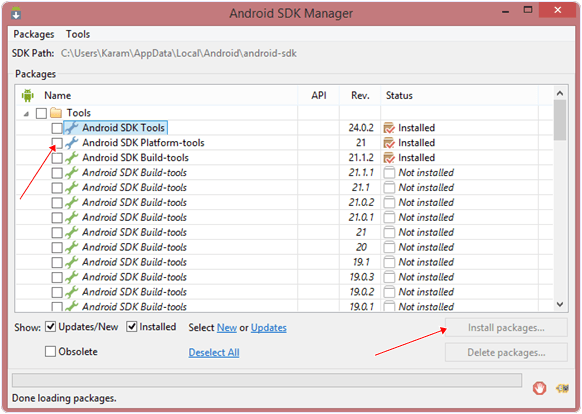
1. First Requirement is Download Android SDK and here I will show you How To download and install Android SDK Tools.
Download and install Android SDK Tools for run ADB commands.Nowselect platform according to you download and install it.
After installing open it, unchecked the other packages and check Android SDK Platform-tools and then click on install packages according to the image given below.
2. So the other requirement is USB Debugging should be enable before your android device locked. 3. The process will not be helpful if you doesn’t have specific
and compatible drivers for your phone. So you should be very careful
While installing your device compatible drivers.
Steps To Unlock Android Pattern Lock
Step 1. Connect your locked android phone with PC/Laptop via USB. Step 2. Open folder where you installed Android SDK Tools Users
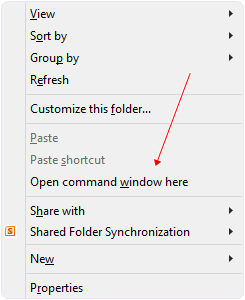
>> App Data >> Local >> Android >> Android-SDK
>> Platform-Tools and then click on blank space hold shift and
click right mouse button and select “open command window here”. Step 3. It will open you command window now you have to put some commands in the command window:-
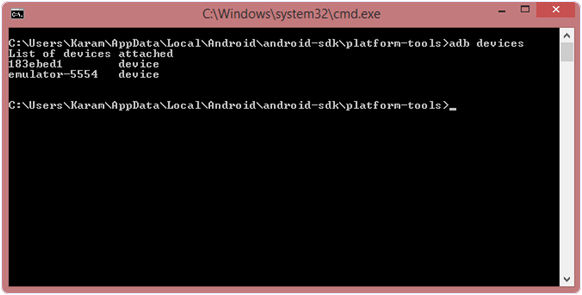
For check your device is connected or not put command:-
adb devices
Now put these commands:-
adb shell cd /data/data/com.android.providers.settings/databases sqlite3 settings.db update system set value=0 where name=’lock_pattern_autolock’; update system set value=0 where name=’lockscreen.lockedoutpermanently’; .quit
If above commands not working put:-
adb shell rm /data/system/gesture.key
Step 4. Once you done you have to reboot your android device. Now its all done.
After rebooting your device you will see the pattern lock disabled. So
in this method USB Debugging should be enable before locked and it is
must. But If it is not enable then you cannot proceed further steps.
Method 3rd:- Unlock Pattern With Factory Settings (Data Will Lost)
In the above methods we used PC/Laptop,
we downloaded software and we put some commands. But if you haven’t
PC/Laptop or your device was not enable USB Debugging then you can
follow this method
Note:- In this method your all data will be lost. So if you do not want to lose your data then don’t follow this method.
Step 1. First Switch off your Locked Android Device. Step 2. Now, boot your Android device into “Recovery Mode” using specific keys by holding power key and volume up key simultaneously. Step 3. After opening Recovery Mode
Select “Factory Data Reset” option and give “Yes“.
Select “Wipe Cache Partition” to wipe cache data.
Step 4. After above steps Reboot your device.
Step 5. All Done ! Now, your device will start from the scratch.
I
feel that you have learn something interesting facts about how to unlock
pattern lock on android. But few may use this to hack but we can you
this in a right way to open someone phone or even yours in trouble time.
If you have any question leave your comments below.